
Adaptive Planning for legacy ERP gives finance teams a way to improve forecasting, reporting, and scenario analysis without waiting for a full ERP replacement. The ERP can remain the accounting system of record while Workday Adaptive Planning connects plans, operational drivers, and actual results.
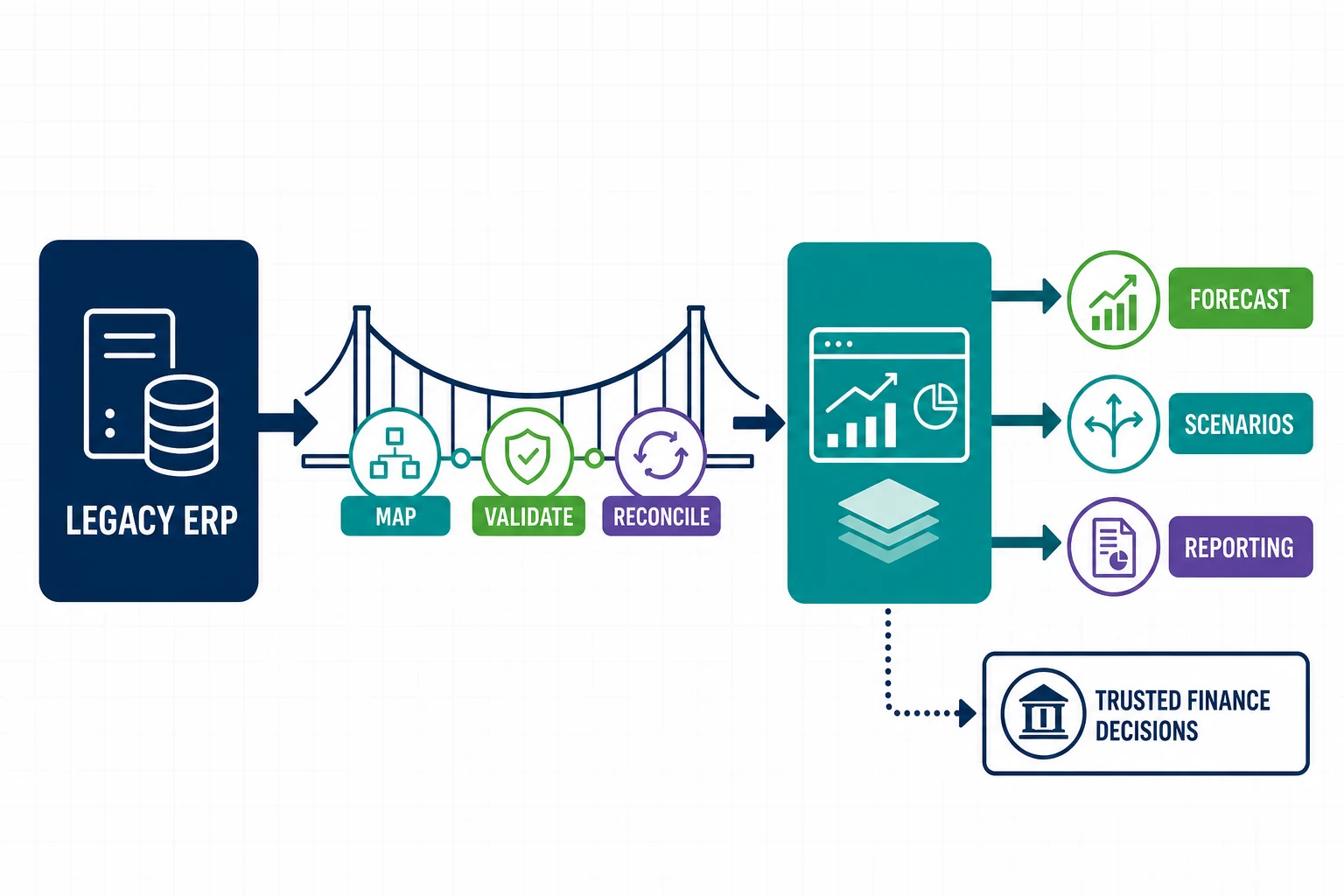
This approach works best as a controlled modernization program. Finance should define the questions it needs to answer, map each source, assign data owners, and reconcile every load. The goal is a dependable planning layer, not another collection of disconnected spreadsheets.
Why Use Adaptive Planning Before Replacing the ERP?
A legacy ERP may still post accurate transactions while creating slow budgeting cycles, limited scenario modeling, and manual management reporting. Adaptive Planning for legacy ERP addresses those planning constraints while the organization evaluates a longer-term finance roadmap.
Workday describes Adaptive Planning as ERP-agnostic and able to connect ERP and cloud warehouse data. Its budgeting and forecasting capabilities support rolling forecasts, driver-based models, and shared what-if scenarios.
1. Define the Finance Decisions and Measures
Start with decisions, not software features. Identify which leaders need faster answers and how you will measure improvement. Examples include forecast cycle time, variance explanation time, data reconciliation effort, and the number of offline models used for executive reporting.
- Set the planning horizon and forecast cadence
- Name the business drivers for revenue, labor, and expense
- Assign owners for assumptions and approvals
- Define reconciliation tolerances and sign-off rules
2. Map Legacy ERP Data and Ownership
Inventory chart-of-account values, entities, cost centers, projects, customers, products, currencies, and historical balances. Document where each field originates, how often it changes, and who approves corrections. Adaptive Planning for legacy ERP depends on stable mappings between source dimensions and the planning model.
Profile the data before building integrations. Duplicate codes, inactive members, missing hierarchies, and inconsistent time periods should become tracked remediation items rather than hidden transformation logic.
3. Build a Governed Integration Pattern
Choose a repeatable load pattern for actuals, metadata, and operational drivers. Record schedules, dependencies, failure alerts, restart procedures, and reconciliation outputs. Keep transformation rules versioned so finance and IT can explain how source records become planning values.
Use separate development, testing, and production controls. Test late-arriving transactions, reopened periods, hierarchy changes, and failed files before relying on automated refreshes.
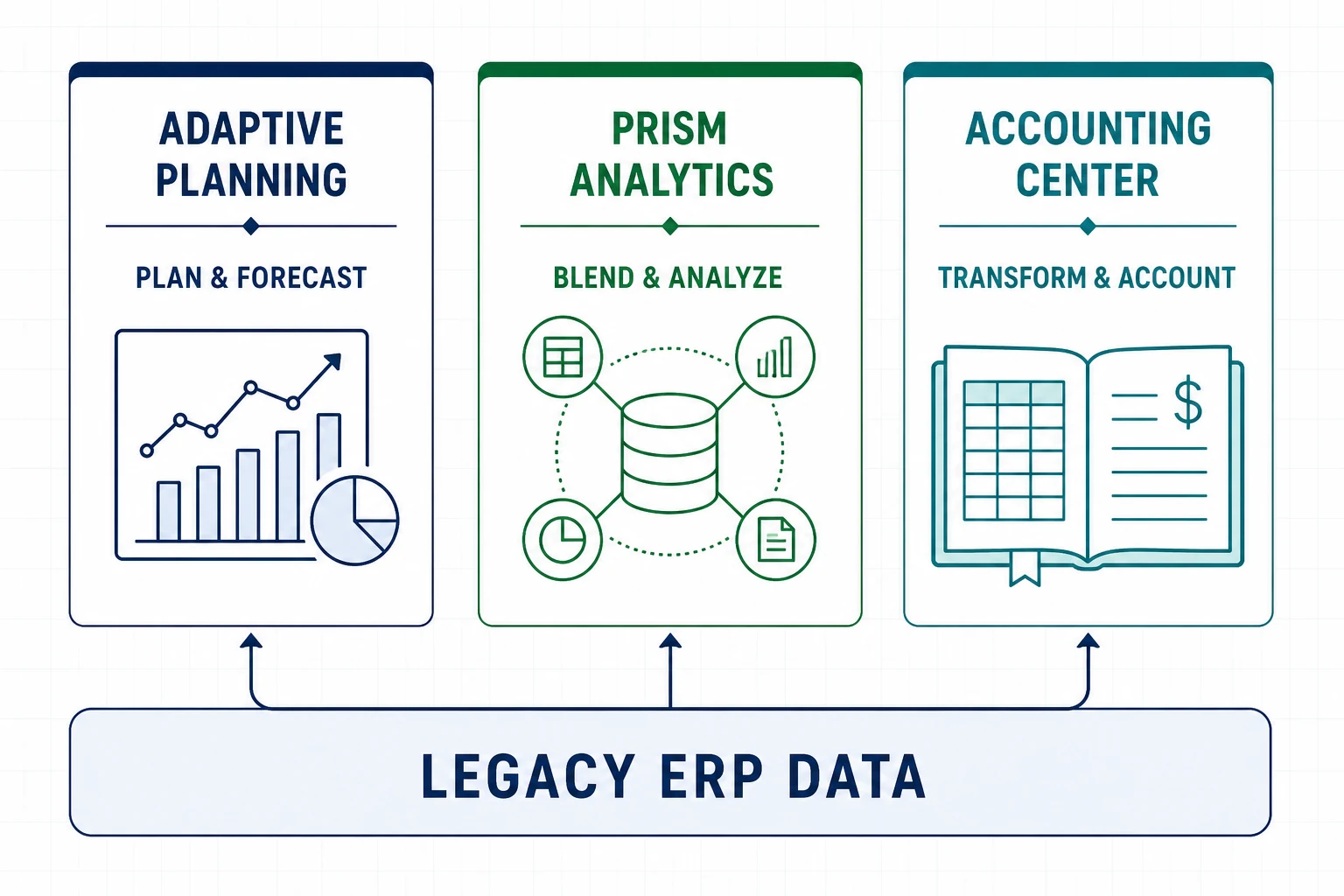
4. Connect Prism Analytics and Accounting Center Where They Fit
Workday documents that Prism Analytics can ingest, blend, and transform Workday and external data. Accounting Center can use that data to create accounting for high-volume transactions from non-Workday sources.
These products solve different problems from planning. Use Prism when reporting needs governed external detail, Accounting Center when operational events need accounting rules, and Adaptive Planning when teams need budgets, forecasts, and scenarios. A clear boundary prevents duplicated logic.
5. Design the Model Around Business Drivers
Build calculations around volumes, rates, staffing, capacity, and other controllable drivers. Preserve a line of sight from assumptions to financial outcomes. A model that mirrors every ERP table may be hard to maintain and offers little advantage over the source system.
Start with one planning domain and a manageable history window. Validate totals at each stage, then add detail only when it supports a named decision.
6. Test Scenarios, Security, and Reconciliation
Test base, upside, downside, and operational stress scenarios with the people who own the assumptions. Confirm that role-based access prevents users from seeing or changing data outside their responsibility. Reconcile source totals, translated currencies, allocations, and consolidated results.
Adaptive Planning for legacy ERP earns trust when reviewers can trace a reported number to its source, transformation, assumption, and approval history.
7. Establish an ERP Transition Roadmap
Document which integrations and models will remain, change, or retire during a future ERP program. Avoid temporary interfaces that become permanent without an owner. Set review dates for source quality, performance, model complexity, and manual workarounds.
Treat the planning platform as part of the target architecture. The organization can preserve useful models and governance while replacing source feeds in controlled stages.
Operating Controls for Reliable Planning
Give each recurring load a named business owner and technical owner. The runbook should state the expected source totals, delivery time, control totals, exception thresholds, and approval evidence. Finance should know whether it is reviewing complete actuals or a partial load before opening a forecast cycle.
Track rejected records and manual journals separately from successful loads. Review aging exceptions, repeated mapping failures, and overrides during the monthly close. These controls help Adaptive Planning for legacy ERP remain dependable when the source system has inconsistent master data or limited automation.
Set calendar checkpoints for metadata freezes, actuals loads, plan submissions, consolidation, and executive reporting. Test the recovery procedure before a critical cycle. If a load fails, the team should know who pauses downstream work, who corrects the source, who reruns the interface, and who signs off on the restored totals. Record each exception so recurring defects become funded backlog items rather than monthly surprises.
Common Modernization Failure Modes
Programs struggle when teams copy every spreadsheet into the new model, embed undocumented transformations, or add detail that no decision requires. Another common problem is allowing multiple reports to calculate the same measure differently. Name one governed calculation and retire duplicate logic after users validate the replacement.
Capacity also matters. Assign administrators for model changes, integrations, security, reporting, and user support. Build regression tests for material calculations and source mappings. A quarterly design review can identify unused dimensions, slow reports, brittle integrations, and temporary workarounds before they disrupt planning.
Adaptive Planning for Legacy ERP FAQs
Does Adaptive Planning replace a legacy ERP?
No. It can provide a connected planning and reporting layer while the ERP continues to process and store accounting transactions.
Which data should move first?
Begin with the dimensions, actuals, and operational drivers required for one high-value planning process. Add sources after reconciliation and ownership work reliably.
How does EVOCS help?
EVOCS supports finance architecture, data mapping, integration design, planning models, testing, and governance. Contact EVOCS to review an Adaptive Planning for legacy ERP roadmap.